1Password Protects and Prevents

We live in a threatening and dangerous world where we cannot even trust our own government not to deceive and disappoint us.  Security of our proprietary information is paramount in the vulnerable warp and woof of our social fabric, and that’s why — even when I first reviewed 1Password way back on December 8, 2009 — I knew securing all my passwords in a single, super-hardened, space was not only important, but necessary:

It took me several days to change and update all my passwords — but once that dirty deed was done, I was able to relax a bit in my core knowing I now had randomized and much more secure passwords covering my life — and the great thing is I don’t have to remember any of them!

1Password remembers all those passwords and usernames and automatically logs me in with the touch of a button on my web browser.

1Password also has an iPhone app that will sync — unfortunately via WiFi only, and both your computer and iPhone must be on the same WiFi network — your desktop accounts and passwords back and forth so you can be safe and secure when you’re online with your iPhone as well.

Continue reading → 1Password Protects and Prevents

The Apple AirPort Time Capsule Review: 3TB Edition

Of all the electronic doodads I am surrounded by every day, the one I use the most, and the one that gets the least amount of appreciative forethought, is my AirPort Time Capsule — my silent sentinel.  My AirPort Time Capsule connects and manages all my iPhone and iPad and Apple TV and wireless printer WiFi connections to the internets, and it backs up all my most precious data.  When Apple released a new AirPort Time Capsule this week, I loved the new design, and I upped my commitment at the 3TB level and I have been delighted ever since.

Continue reading → The Apple AirPort Time Capsule Review: 3TB Edition

Your Life on Live Internet Protocol: Text is Out, Video is In

Technical advances in the scientific field serve a dire need first and then those totems of communication and facilitation trickle down to the mainstream.  The Deaf popularized pagers first, followed by the Hearing community in everyday business, then there was the move to SMS in cellphones and today, the new trend is video conferencing in your iPhone or iPad.  The image below shows the first TTY — teletypewriter — that the Deaf used to communicate with each other in end-to-end conversations.

Continue reading → Your Life on Live Internet Protocol: Text is Out, Video is In

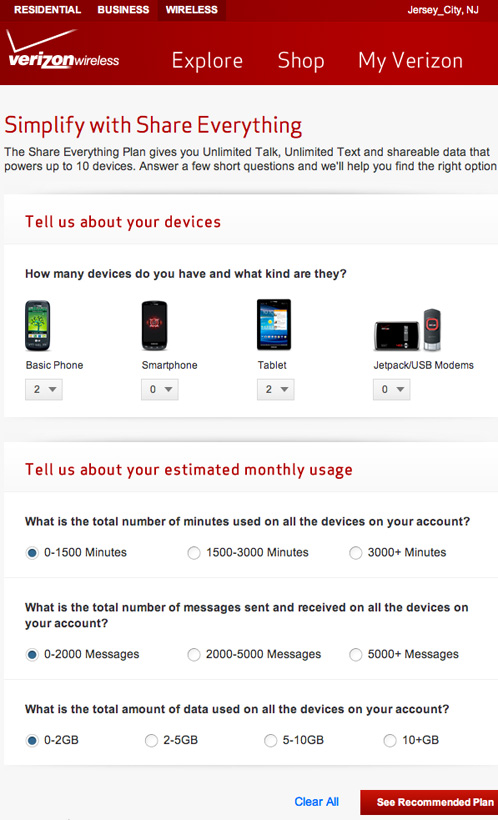
Why I Moved Up to the Verizon Share Everything Plan: They Will Not Flip Your SIM!

Yesterday, I spent my morning stuck in a Verizon store — not trying to order the new iPhone 5 — but rather trying to achieve one simple task: Swapping out the old SIM cards on my two iPad 2(s) and not getting very far, even though I had already done my web research and wasted an hour on the phone with Verizon customer support telling me the only way to add the iPads to my new “Share Everything Plan” was to replace the SIM cards because a “pre-pay” SIM card is hardcoded in the Verizon system as a standalone device and the only way to add an iPad to a shared data plan is to replace the pre-pay SIM card with a “post-pay” SIM card.

Easy, right?

Not so fast!

Continue reading → Why I Moved Up to the Verizon Share Everything Plan: They Will Not Flip Your SIM!

Using Junecloud Delivery Status to Thwart Faked Delivery Attempts

One popular article I wrote for the Boles Blogs Network appeared in Celebrity Semiotic on  August 5, 2010 — Divorcing Amazon Prime Because of A-1 Courier Services Cheating — and that post is still going full-steam with comments, 315 as of this writing, with no end in stopping.  When an article like that stays on blast — it is usually fury and injustice that drives the popularity — all that, plus an excellent Google ranking for a search on “A-1 Courier” always helps.  There would be no searches without the rage, and so the hits, and the comments, keep coming against A-1.

In my replies for the article, I realized I should share my method for thwarting faked delivery attempts from FedEx and UPS and other companies.  Unfortunately, A-1 is not currently in my App cache, and I’m sure they would never want to be included because then their deceptive end game would be over.

I use Junecloud’s excellent Delivery Status on my Mac as a widget and on my iPhone and iPad as an App.  The widget and Apps all communicate with each other via the Junecloud.com website, so each device is always in sync with the latest delivery updates and my day is saved in so many ways.

Continue reading → Using Junecloud Delivery Status to Thwart Faked Delivery Attempts

Clash Mobs and Infinity Blade 2

I’m a new owner of the retina display iPad, but I’m a bit of a latecomer to the Infinity Blade 2 game.  I’ve been playing the game for several days now and I’m having a delightful time leveling up, collecting all sorts of goodies and forging new gems from old gems.  The game looks beautifully and plays exceptionally fine in every aspect.

Continue reading → Clash Mobs and Infinity Blade 2

My Obsessive Verizon LTE iPad Testing Continues

I confess I am obsessed with trying to figure out why Verizon LTE is so sucky on our two brand-new iPads.  Yesterday, we were at the dentist’s office in Jersey City and I asked Janna to pull out her iPad to see what kind of service levels we were getting.  Our dentist is one block away from our home where I was getting two Verizon LTE bars and 1.7Mbps down and 1.47Mpbs up.  At the dentist’s office, the iPad was screaming at 25.94Mbps down and 10.35Mbps up with four bars of Verizon LTE active!  Amazing!  An outrage!

Continue reading → My Obsessive Verizon LTE iPad Testing Continues

Failure of Verizon LTE on the New iPad

I had high hopes for Verizon and their LTE network when I first unboxed my new iPad. I knew the LTE spec could be as high as 20Mbps down and 10Mbps up — but I’d settle for half of those numbers.  I’d read reports that people were getting LTE speeds in NYC of 10Mbps down and 6Mbps up and I’d love to be able to live that fast on the web.

Unfortunately, my initial tests in Jersey City were lousy, and yesterday, I did some informal LTE testing around Bryant Park in New York City.  You’d think at 6th Avenue and 40th Street you’d have a saturating LTE signal from Verizon.  Here are the results of my first, dismal, test:  Two Verizon LTE bars and 1.7Mbps down and 1.47Mpbs up.  Ugh.  That’s miserable 3G territory!

Continue reading → Failure of Verizon LTE on the New iPad

New iPads Arrive: Typekit Fonts Now a Blogging Necessity

Today was a busy and glorious day. Our new iPads arrived three days early from China and we enjoyed setting them up via iCloud and experiencing our first, if limited, tastes of LTE on Verizon. In Jersey City, LTE comes and goes in our apartment. Sometimes it flickers to life. Other times, we’re stuck on 3G with no way to understand the why or wherefore of being pressed off the LTE network. Here’s a quickie screenshot I was able to grab of my iPad on LTE with two service bars active. 5.67 Mbps down and 0.19 Mbps up.

Continue reading → New iPads Arrive: Typekit Fonts Now a Blogging Necessity

OnLive Desktop Plus Review for iPad

UPDATE: February 24, 2012
I was using Internet Explorer via OnLive last night and the speed was so fast I decided to see if I could get quantification for download and upload speeds for the Plus service.  I couldn’t get my old favorite, Speakeasy, to load on OnLive, but I was able to get Speedtest.net to work and here are the results:  An astonishing 88.05Mbps down and a fantastical 70.72Mbps up.  Now that’s some fast internet!  NYU slowly turns green

Today, I just shelled out my first $5.00USD monthly fee for OnLive Desktop Plus for my iPad 2.  I decided to go the money route for OnLive Desktop Plus to get priority access because the free version is incredibly slow and monotonous.  I also wanted to see just how fast the Internet Explorer 9 interface was on the iPad going through the OnLive Desktop Plus backend.

Continue reading → OnLive Desktop Plus Review for iPad